
WordPress allows users to easily embed video links from YouTube or Vimeo directly onto a page.
But what happens if you are collecting a video link in a custom field and then trying to show the video on a page?
This can be done via the [codelet]wp_oembed_get()[/codelet] function but that strips out any parameters such as autoplay or rel (related content).
Here’s how to take a video link from a WordPress custom field, display the video and pass parameters such as autoplay.
Collecting the Video Link
You can collect a video link in heaps of different ways using WordPress; on a page using a custom field, by extended user profiles or custom post types.
We’re going to use a simple page and a custom field called [codelet]lc_video_link[/codelet] which contains a YouTube video link.
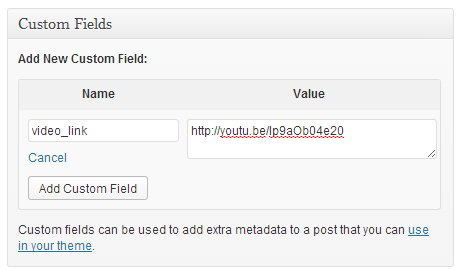
To get this field, we’ll use the [codelet]get_post_meta()[/codelet] function.
[codelet]$video_link = get_post_meta( $post->ID, ‘lc_video_link’, true );[/codelet]
Now we have our link in a PHP variable $video_link.
Displaying the Video Link
To display the link as a video on our page we use the [codelet]wp_oembed_get()[/codelet] function.
[codelet]$video_embed_code = wp_oembed_get( $video_link, array( ‘autoplay’ => 1, ‘rel’ => 0) );[/codelet]
If you refresh the page where you placed this code you’ll see your video rendered as an iframe object on the page.

However, it’s not autoplaying. Why?
The [codelet]wp_oembed_get()[/codelet] function allows you to pass arguments to the iframe (only width and height work just now) but not the video inside the iframe.
Bummer!
Filters to the Rescue
How much do you like WordPress filters?
I’m sure you’ll be a big fan after this.
We’re going to write a filter that grabs and modifies the output that the [codelet]wp_oembed_get()[/codelet] function generates, passing our arguments directly to the video.
Here’s the code to put in your functions.php file:
[gist id=8142700 file=code-snippet-1.php]
Line 2 – adds our custom function [codelet]lc_oembed_result[/codelet] to the [codelet]oembed_result/[/codelet] filter.
Line 7 – makes a copy of the arguments array
Line 9 – gets rid of the last array argument which is always “discover/true”, using [codelet]array_pop()[/codelet].
Now we have all of our passed arguments available.
Line 11 – uses the [codelet]http_build_query[/codelet] function to take an associative array and badger it down into a string in the usual http parameter format.
In this example, [codelet]$parameters[/codelet] will contain [codelet]”autoplay=1&rel=0″[/codelet].
Line 14 – this is where we modify (filter) the output of the [codelet]wp_oembed_get[/codelet] function.
The [codelet]$html[/codelet] variable holds the entire iframe code, including the video URL which has the parameters we want to add to.
[codelet]<iframe width=”500″ height=”281″ src=”http://www.youtube.com/embed/lp9aOb04e20?feature=oembed” frameborder=”0″ allowfullscreen></iframe>[/codelet]
We search for and replace the generated parameter [codelet]?feature=oembed[?codelet] with the same string plus an ampersand then our [codelet]$parameters[/codelet] variable building up the complete url.
You can of course run it all together as one string. I just showed the concatenation so that’s it’s easier to see what’s being added.
The result is this:
[codelet]<iframe width=”500″ height=”281″ src=”http://www.youtube.com/embed/lp9aOb04e20?feature=oembed&autoplay=1&rel=0″ frameborder=”0″ allowfullscreen></iframe>[/codelet]
Line 16 – returns the modified code back to the filter.
Using Other Video Services
This example is for YouTube but it will work well with other video services such as Vimeo (example here).
You can extend the code on your page, around the [codelet]wp_oembed_get()[/codelet] function, to detect which service is being used and only pass in parameters used by that particular service.
This can be achieved simply by performing a string search in the [codelet]$video_link[/codelet] variable.
Let us know what different services you’ve used this code with.
Fantastic, just what I’ve been searching for 🙂 But is there also a way to retrieve the thumbnail?
Thanks for sharing. But how would you go about a link from vimeo.com? The is no such string as ‘?feature=oembed’ that I can make ‘str_replace’ work on. It is just the video’s id at the end of the url. Hope you can help me on that. I tried codex and lots of google searching but couldn’t find a hint.
Thanks Wil. This works fantastic. I owe you a beer!
oh my godddd… i don’t get why seems like we are ‘not allowed’ to create a nice video / audio URL custom field that will make the backend look much more organized & making sense, while clearly the thing is capable of post format audio & video. I love wordpress but sometimes it drives me nuts cause of missing small details that makes you go like ‘why on earth didn’t they do that?’. I didn’t even get to display a thumbnail at all… all I got was either friggin text of the link or the link. And there’s not many others care about this like you did, one thing I don’t get either. So thank you thank you thank you!!
You are awesome! Thanks so much for this.
Hi, i used it for daily motion videos . it is working but full screen option is not working
Any one answer my question below
Thanks for this, though it turned out I had to apply the filter to embed_oembed_html instead of oembed_result
So line 2 of your code above had to be
add_filter( ’embed_oembed_html’, ‘add_youtube_params’, 10, 3 );
instead of
add_filter(‘oembed_result’,’lc_oembed_result’, 10, 3);
Being a rookie in WP I cannot explain why. I think it may have to do with some caching of the source code.